Securing Your App: TOTP Authentication with Spring Boot and Angular — Part One — Overview &…
Add TOTP two-factor authentication to a Spring Boot and Angular app. Part 1 covers how TOTP works, the overview and the project setup.
Securing Your App: TOTP Authentication with Spring Boot and Angular — Part One — Overview & Project Setup
Title
What is TOTP?
TOTP stands for Time-based One-Time Passwords and is a common form of two-factor authentication (2FA). Unique numeric passwords are generated with a standardized algorithm that uses the current time as an input. The time-based passwords are available offline and provide user-friendly, increased account security when used as a second factor.
TOTP is also known as app-based authentication, software tokens, or soft tokens. Authentication apps like Microsoft Authenticator and Google Authenticator support the TOTP standard.
When TOTP?
Imagine a secure system that combines something you know (like a password) with something you have (a device generating a one-time password). That’s where TOTP comes in.
How does TOTP work?
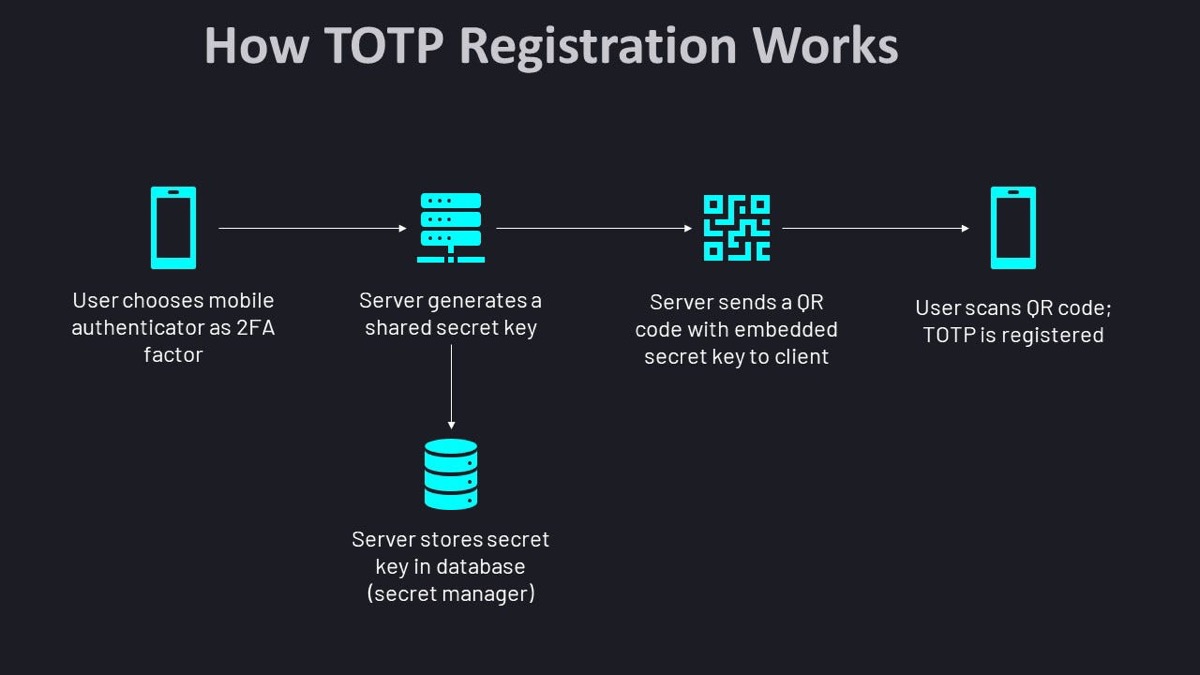
When the user registers into our application system will generate a secret key and that will be stored in DB. The system will generate a QR code that combines the Algorithm, number of digits, and period that will be used by the server to generate the TOTP.
How TOTP QR code generated and user registration
Upon login, the user will provide the credentials and validate. As a next step, they will be prompted for OTP. This will be generated by the authenticator application, this will be validated by the server using the time bucket the OTP is entered.
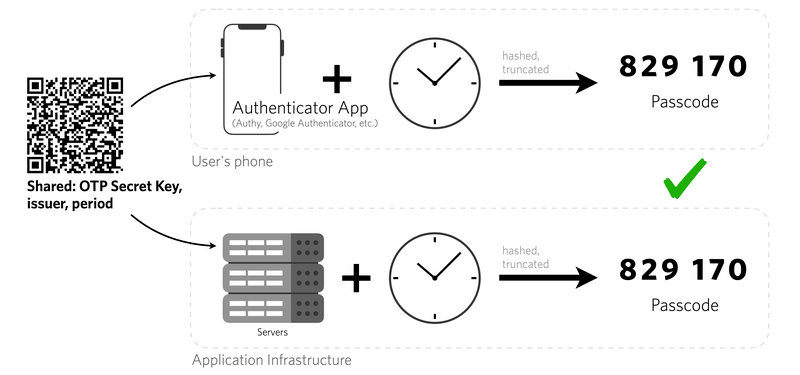
TOTP validation
Project:
We will implement the Backend server in Spring Boot and Mongo DB as a Persistence layer. Angular 14 is our Front end which will connect to the backend over rest endpoints. We will be using “dev.samstevens.totp” to generate and verify TOTP.
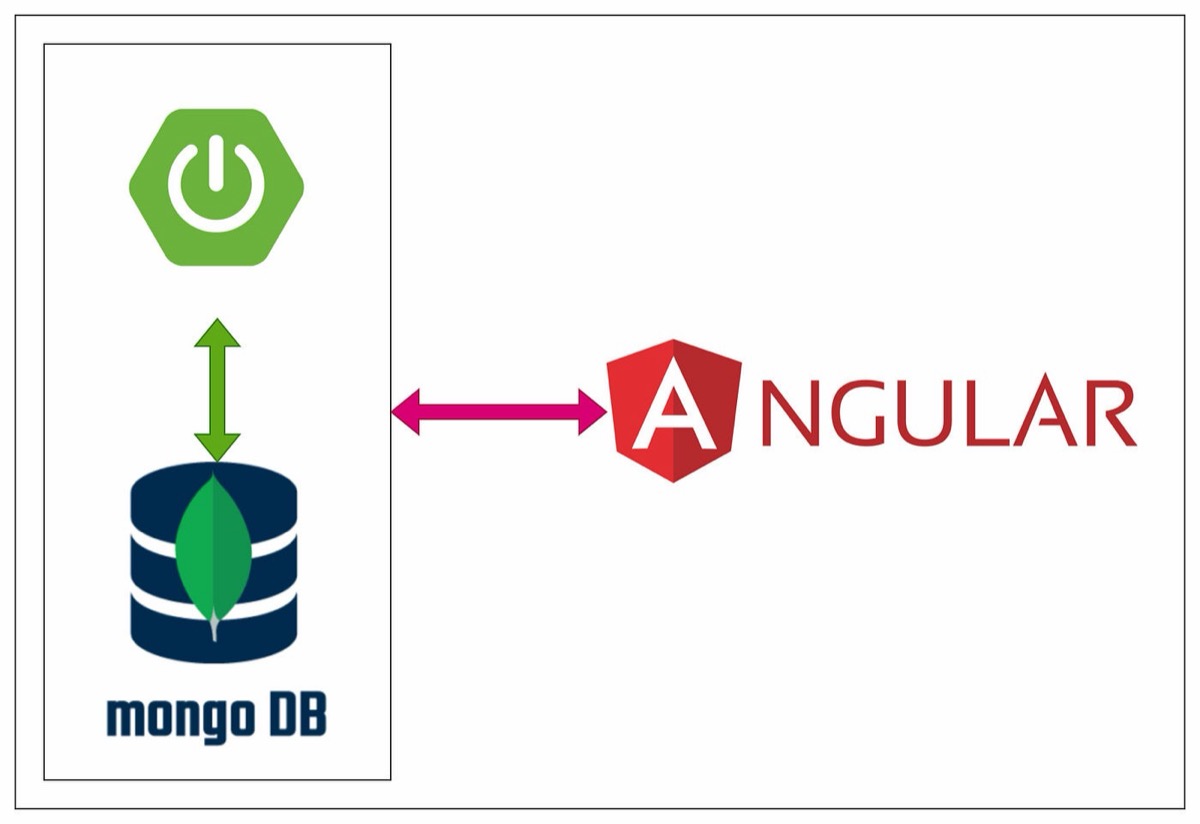
Arch High-level
End-Point Implementation Overview:
/register
register endpoint will accept the registration details including the username and password as payload. It will check for user existence, if the user already exists then respond with a UserAlreadyExist exception, else Generate the Secret key, encode the password received, and persist the user details. Further, generate the QR code and add it to the response.
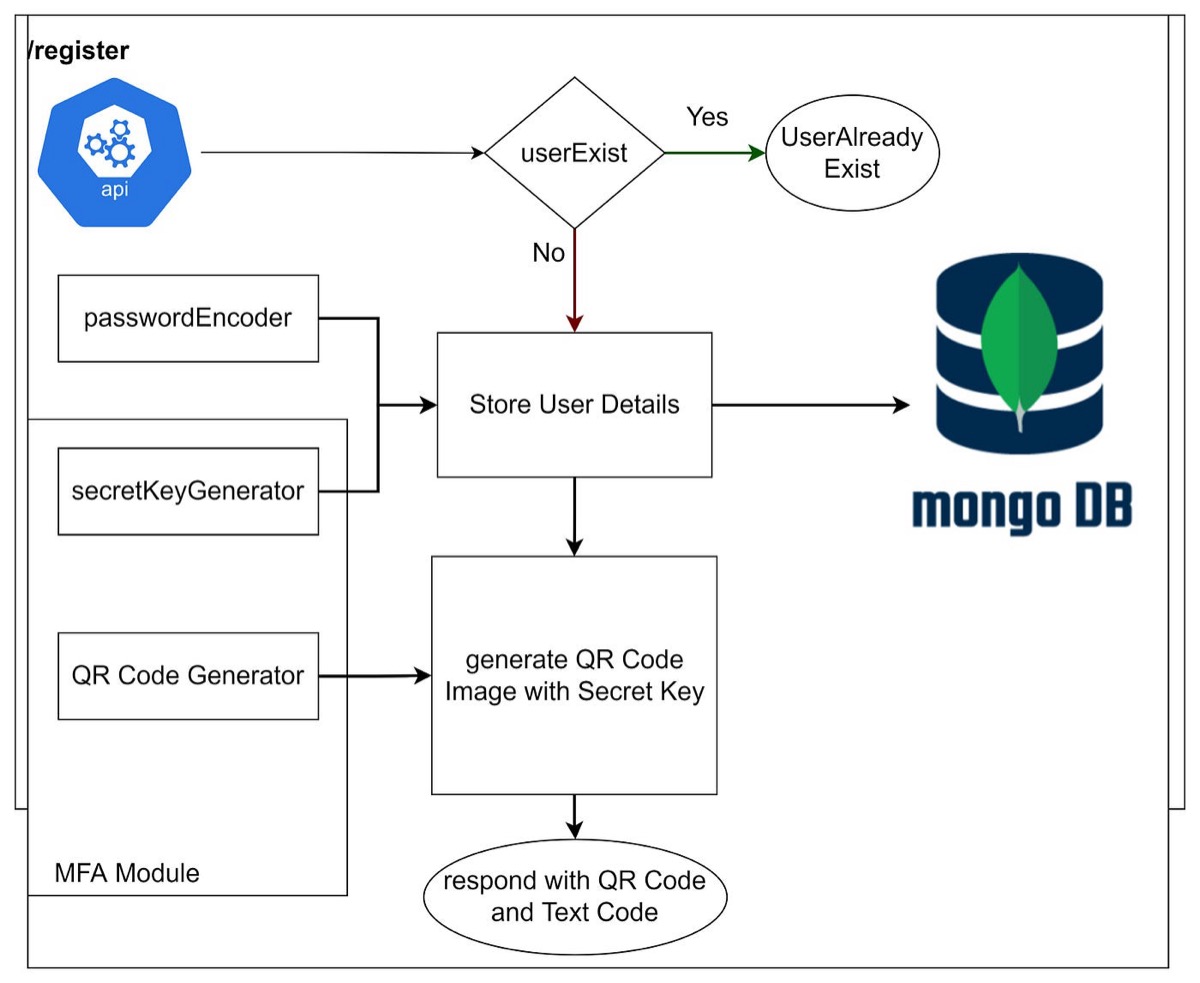
/register workflow
/verifyTotp
This endpoint accepts username and TOTP as payload. It will fetch the secret key with the username provided and pass it to the verify method of “dev.samstevens.totp” code verifier. If the code is valid then it will generate the JWT and respond. Else it will respond as an Invalid Token.
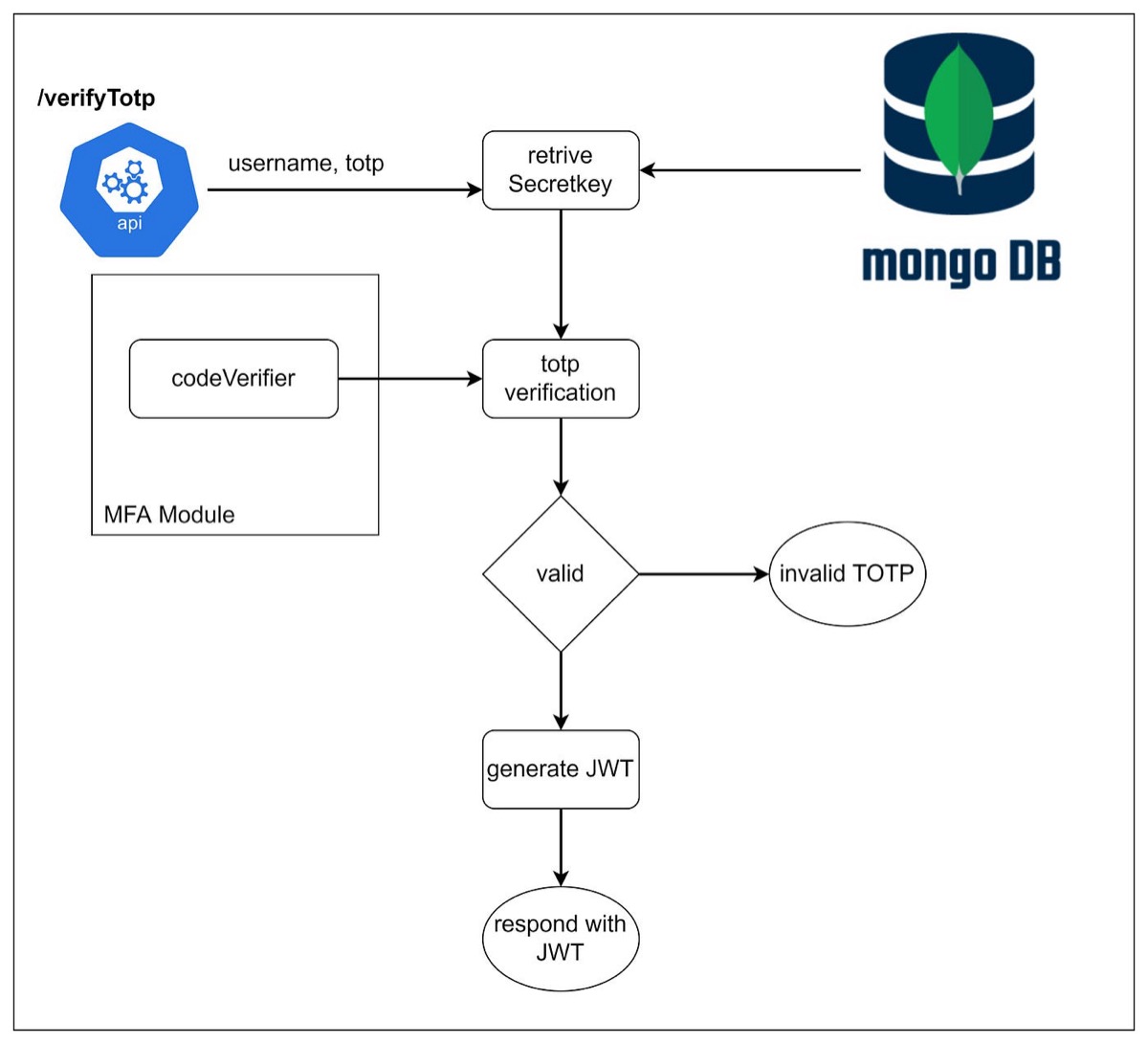
/verifyTotp workflow
/login
This endpoint will get the username and password as payload and validate with the AuthProvider. If the credentials are valid and the user opted for MFA then respond with MFA Required. Else generate the JWT.
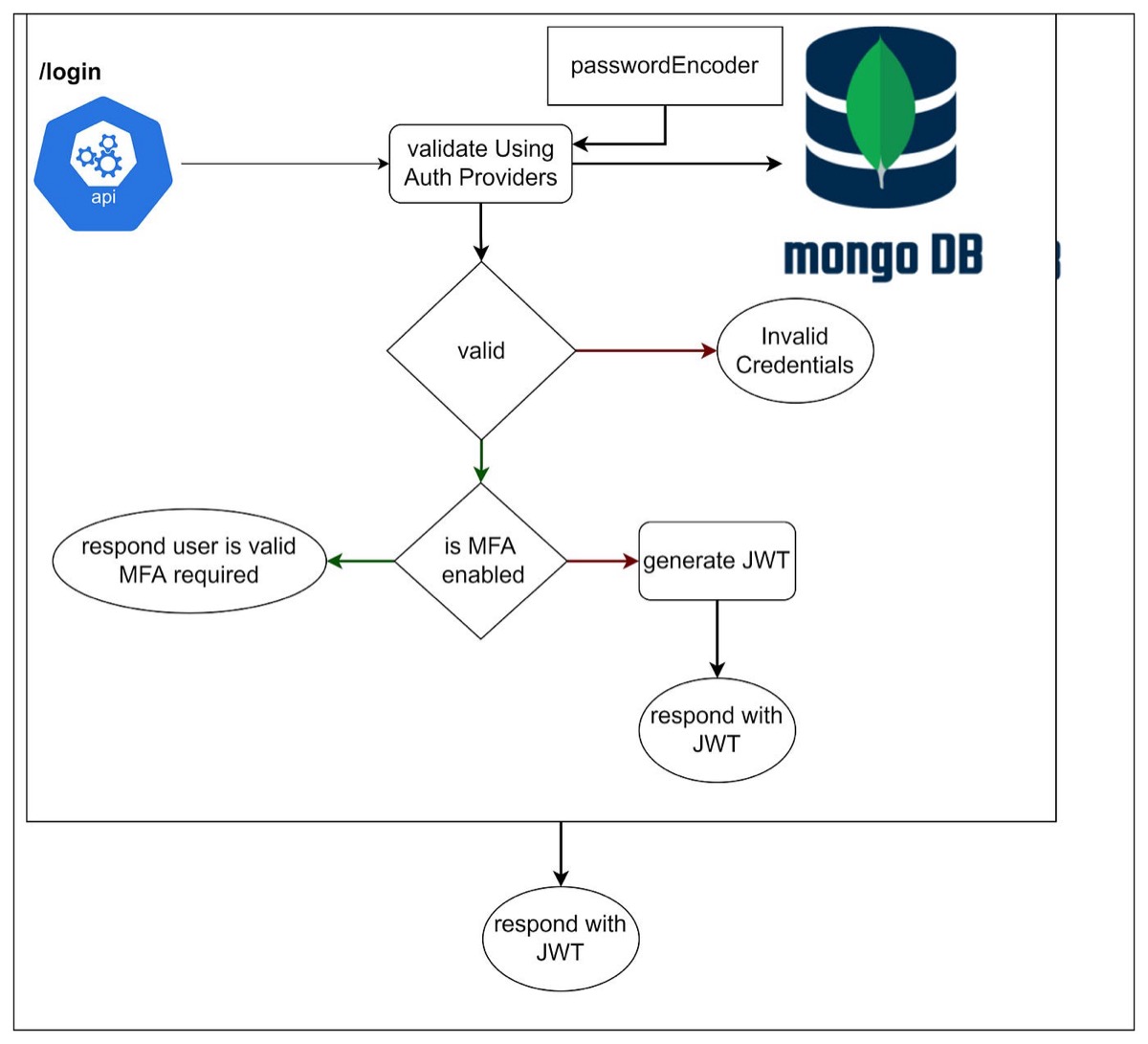
/login workflow
Project Setup:
Create a Spring Boot Project with the following dependencies,
<dependency>
   <groupId>org.springframework.boot</groupId>
   <artifactId>spring-boot-starter-data-mongodb</artifactId>
  </dependency>
  <dependency>
   <groupId>org.springframework.boot</groupId>
   <artifactId>spring-boot-starter-mail</artifactId>
  </dependency>
  <dependency>
   <groupId>org.springframework.boot</groupId>
   <artifactId>spring-boot-starter-security</artifactId>
  </dependency>
  <dependency>
   <groupId>org.springframework.boot</groupId>
   <artifactId>spring-boot-starter-web</artifactId>
  </dependency>
  <dependency>
   <groupId>dev.samstevens.totp</groupId>
   <artifactId>totp</artifactId>
   <version>1.7.1</version>
  </dependency>
  <dependency>
   <groupId>org.springframework.boot</groupId>
   <artifactId>spring-boot-starter-validation</artifactId>
  </dependency>
  <dependency>
   <groupId>org.springframework.boot</groupId>
   <artifactId>spring-boot-devtools</artifactId>
   <scope>runtime</scope>
   <optional>true</optional>
  </dependency>
  <dependency>
   <groupId>org.projectlombok</groupId>
   <artifactId>lombok</artifactId>
   <optional>true</optional>
  </dependency>
spring:
  application:
    name: mfa-server
  data:
    mongodb:
      host: localhost
      port: 27017
      database: mfa-server
Create a web security configuration class for all endpoints. Also, create a bean if BCryptPasswordEncoder.
@EnableWebSecurity
@Configuration
public class AppSecurityConfig {

    @Bean
    public PasswordEncoder passwordEncoder(){
        return new BCryptPasswordEncoder();
    }

    @Bean
    public SecurityFilterChain defaultFilterChain(HttpSecurity httpSecurity) throws Exception {
        return httpSecurity
                .cors(cors-> cors.disable())
                .csrf(csrf-> csrf.disable())
                .sessionManagement(session-> session.sessionCreationPolicy(SessionCreationPolicy.STATELESS))
                .authorizeHttpRequests(auth-> auth
                        .requestMatchers("/error**","/register**","/login**","/verifyTotp**").permitAll()
                        .anyRequest().authenticated()
                )
               .build();
    }
}
Create User Entity. This stores the user details, credentials and roles.
@Document(collection = "users")
@NoArgsConstructor
@AllArgsConstructor
@Data
public class User {
    @Id
    private String id;
    @Indexed
    @NotBlank
    private String username;
    private String password;
    boolean mfaEnabled;
    @JsonIgnore
    private String secretKey;
    private String firstName;
    private String lastName;
    private boolean active;
    @DBRef
    private Set<Role> roles = new HashSet<>();
}
Create UserRepository.
@Repository
public interface UserRepository extends MongoRepository<User, Long> {
    Optional<User> findByUsername(String username);
}
Create a Service that Helps us Register and Verify Totp
public interface UserService {
    MfaTokenData registerUser(User user) throws UserAlreadyExistException, QrGenerationException;
    boolean verifyTotp(final String code,String username);
}
Create a Controller exposing the endpoints for /register, /login, and /verifyTotp.
We will look into the Implementation in our next blog.
Securing Your App with TOTP, Part Two: Implementation
Angular Project Setup
Create an angular project and include Bootstrap.
"styles": [
"node_modules/bootstrap/scss/bootstrap.scss" ,
"src/styles.scss"
],
"scripts": [
"node_modules/bootstrap/dist/js/bootstrap.bundle.js"
]
Create a client service that connects with the backend over the rest endpoints.
@Injectable({
  providedIn: 'root'
})
export class AuthClientService {

  constructor(private http: HttpClient) { }

  public login(payload: string): Observable<MfaVerificationResponse> {
    const httpOptions = {
      headers: new HttpHeaders({
        'Content-Type':  'application/json'
      })
    };
    return this.http.post<MfaVerificationResponse>(
      environment.apiUrl + '/login', payload, httpOptions
    );
  }

  public verifyTotp(payload: MfaVerificationRequest): Observable<MfaVerificationResponse> {
    return this.http.post<MfaVerificationResponse>(
      environment.apiUrl + '/verifyTotp', payload
    );
  }

  public register(
    payload: string
  ): Observable<string> {
    return this.http.post(
      environment.apiUrl + '/register',payload,
      { responseType: 'text' }
    );
  }
}
Create a Login, Register components as per your wish, and connect them with the client. You can refer to my implementation from below GitHub.
GitHub: amaialth/MFAApplication
Check out the complete code implementation here
Get new articles by email
One short email whenever a new article is published. No spam, unsubscribe anytime.
Keep reading
Spring Boot — Continuous Deployment from GitHub into GCP Cloud Run with Cloud Build
Set up continuous deployment for a Spring Boot app: GitHub as the code repository, Google Cloud Build to build the image and Cloud Run to run it.
Spring Boot with Cloud Spanner
Learn how to connect a Spring Boot application to Google Cloud Spanner, Google's distributed SQL database, with a step-by-step example.
Comments
No comments yet. Be the first to share your thoughts.