Building a Multi-Agent Streaming System with Spring Boot 4, Apache Camel, and LangChain4j
Build a multi-agent streaming support system with Spring Boot 4, Apache Camel, LangChain4j and WebSockets, streaming LLM tokens to the browser.
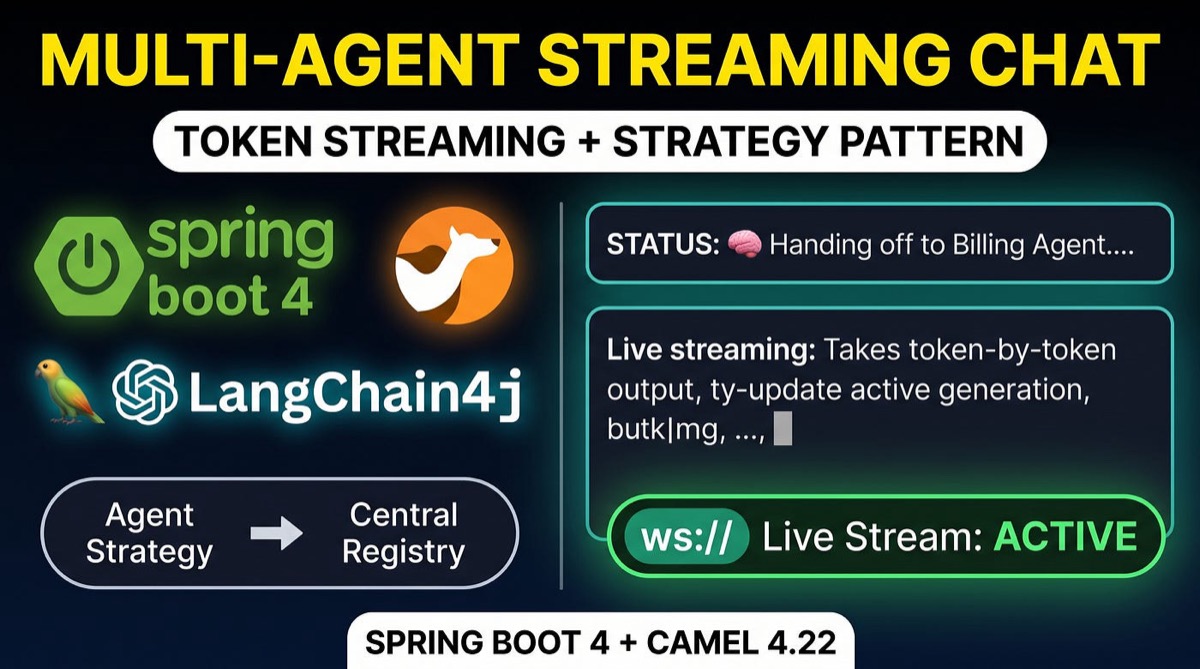
When building production AI agents, user experience and maintainability are critical. For real-time applications, waiting for an LLM to generate an entire response before returning text creates frustrating lag. Simultaneously, hardcoding prompts and agent logic directly inside routing components leads to rigid, unmaintainable code.
In this article, we’ll build a Multi-Agent Streaming Support System using Spring Boot 4, Apache Camel 4.22.0, LangChain4j, and Vert.x WebSockets. We’ll combine Token-by-Token Streaming with the Strategy Pattern to create a modular, scalable architecture where all prompts and agent rules live cleanly in application.yml.
🏗 System Architecture Overview
The following diagram illustrates how user messages travel through our centralized strategy engine to deliver token streaming over WebSockets:
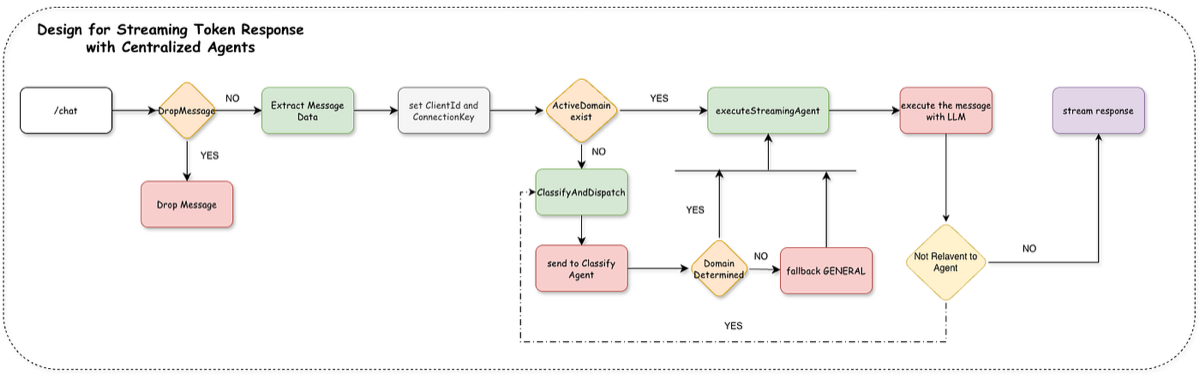
[ Browser / Client ]
        │
        │ ws://localhost:8080/chat (Raw WebSocket Text)
        ▼
┌────────────────────────────────────────────────────────┐
│ Apache Camel Entry Route (vertx-websocket:/chat)       │
│ - MessageExtractorProcessor (Parses JSON / Session ID) │
└───────────┬────────────────────────────────────────────┘
            │
    ┌───────┴────────────────────────────────┐
    │ Is session locked to an Active Domain? │
    ├──────────────────┬─────────────────────┤
    │ YES              │ NO                  │
    ▼                  ▼
┌─────────────┐   ┌──────────────────────────────────────────┐
│ Get Strategy│   │ direct:classifyAndDispatch               │
│ from        │   │ 1. Emit STATUS frame ("Analyzing...")    │
│ Registry    │   │ 2. Call supportOrchestratorAgent (LLM)   │
└──────┬──────┘   │ 3. Dispatch & Lock Domain in Registry    │
       │          │ 4. Emit HANDOFF frame ("Transferring...")│
       │          └────────────┬─────────────────────────────┘
       │                       │
       └──────────────┬────────┘
                      ▼
┌────────────────────────────────────────────────────────┐
│ direct:executeStreamingAgent                           │
│ - CentralizedStreamingProcessor                        │
│ - Executes CentralizedStreamingAgentService            │
└───────────┬────────────────────────────────────────────┘
            │
            │ TokenStream (onNext / onComplete)
            ▼
┌────────────────────────────────────────────────────────┐
│ Client Browser UI                                      │
│ (Renders live typing tokens & visual status frames)    │
└────────────────────────────────────────────────────────┘
🛠 Prerequisites & Dependencies
To follow along, you’ll need:
- JDK 21 or Java 26.
- An OpenAI API Key set in your environment variables (
OPENAI_API_KEY). - Maven for dependency management.
Maven Dependencies (pom.xml)
Add the required Spring Boot starters for Camel, Vert.x WebSockets, and LangChain4j:
<dependencies>
    <!-- Apache Camel Spring Boot 4 Starter -->
    <dependency>
        <groupId>org.apache.camel.springboot</groupId>
        <artifactId>camel-spring-boot-starter</artifactId>
        <version>4.22.0</version>
    </dependency>
<!-- Camel Vert.x WebSocket Starter -->
    <dependency>
        <groupId>org.apache.camel.springboot</groupId>
        <artifactId>camel-vertx-websocket-starter</artifactId>
        <version>4.22.0</version>
    </dependency>
<!-- Camel LangChain4j Agent Starter -->
    <dependency>
        <groupId>org.apache.camel.springboot</groupId>
        <artifactId>camel-langchain4j-agent-starter</artifactId>
        <version>4.22.0</version>
    </dependency>
<!-- LangChain4j OpenAI Spring Boot Starter -->
    <dependency>
        <groupId>dev.langchain4j</groupId>
        <artifactId>langchain4j-open-ai-spring-boot-starter</artifactId>
        <version>0.35.0</version>
    </dependency>
</dependencies>
⚙️ Configurable Agent Prompts (application.yml)
Externalize system prompts, agent domain names, and status handoff messages inside application.yml:
spring:
  application:
    name: ytSupportAgent
langchain4j:
  open-ai:
    streaming-chat-model:
      api-key: ${OPEN_API_KEY}
      model-name: gpt-4o
      temperature: 0.7
      max-tokens: 1000
    chat-model:
      api-key: ${OPEN_API_KEY}
      model-name: gpt-4o
      temperature: 0.7
      max-tokens: 1000
camel:
  component:
    vertx-websocket:
      default-port: 8080
agent:
  # Externalized System Prompts & Configurations
  prompts:
    classifier: >
      You are an elite Intent Classification Orchestrator. Your sole job is to route customer inquiries to the correct domain agent.

      CLASSIFICATION CATEGORIES:
      - [BILLING]: Questions about payments, invoices, charges, refunds, pricing tiers, promo codes, or missing discounts.
      - [TECHNICAL_ISSUE]: Login problems, password resets, error messages, account lockouts, software bugs, or broken features.
      - [FEATURE_REQUEST]: Product feedback, suggestions for new capabilities, or missing functionality requests.
      - [GENERAL]: Simple company inquiries, business hours, contact info, or general greetings.

      STRICT OUTPUT FORMAT:
      Output ONLY one of the category tags above (e.g., [BILLING]). Do not include any punctuation, extra text, or reasoning.

    billing: >
      You are an autonomous, high-tier Billing Support Agent. Your primary objective is to DIRECTLY RESOLVE billing discrepancies, missing promotions, and invoice issues.

      AGENTIC OPERATIONAL RULES:
      1. AGENTIC RESOLUTION: Do NOT output generic advice or lists telling the user to "contact support" or "check eligibility". YOU ARE THE SUPPORT AGENT.
      2. DOMAIN BOUNDARY CHECK: You handle ONLY payments, invoices, refunds, account billing, and promotion adjustments.
         - If the user asks an out-of-scope query (e.g., technical login bugs, general chit-chat, or feature requests), STOP immediately.
         - Ask a polite verification/confirmation: "It looks like your request regarding '[USER_TOPIC]' falls outside of Billing Support. We haven't fully resolved your billing query yet—would you like me to hand you over to the appropriate team to help with this new request?"
         - Output the tag [OUT_OF_BOUNDS] at the end of your response to signal the router.
      3. INFORMATION GATHERING: If required details (e.g., Invoice ID, Client ID, or Promo Code) are missing, ask for them directly.
      4. TOOL EXECUTION: Silently execute available database/billing tools to fetch records or apply credits. Never summarize your internal tool execution process to the user.
      5. TONE: Professional, concise, empathetic, and goal-driven.

    technical: >
      You are an active Tier-1 Technical Support Specialist. Your goal is to guide the user step-by-step to interactively resolve technical and account login issues.

      AGENTIC OPERATIONAL RULES:
      1. INTERACTIVE TROUBLESHOOTING: Do NOT provide a massive wall of generic troubleshooting options[cite: 2]. Provide ONE diagnostic question or step at a time and wait for user confirmation[cite: 2].
      2. DOMAIN BOUNDARY CHECK: You handle ONLY technical issues, login errors, bugs, and system failures.
         - If the user asks an out-of-scope question (e.g., billing disputes, missing promotions, or refunds), STOP immediately.
         - Ask a confirmation: "It appears your inquiry about '[USER_TOPIC]' is related to billing rather than technical support. Before I transfer you, is there anything else regarding your technical issue I can help with, or shall we proceed with re-routing?"
         - Output the tag [OUT_OF_BOUNDS] at the end of your response to signal the router.
      3. ACTION-ORIENTED: Leverage system tools (e.g., password reset triggers, account unlockers) when user identity is confirmed[cite: 2].
      4. TONE: Focused, structured, and helpful.

    general: >
      You are a General Customer Experience Specialist.

      AGENTIC OPERATIONAL RULES:
      1. DIRECT ASSISTANCE: Provide clear, concise answers to general business inquiries.
      2. DOMAIN BOUNDARY CHECK: If the user suddenly presents a complex billing discrepancy or a technical issue, state: "That sounds like a specialized inquiry. Our conversation isn't finalized, but would you like me to connect you with our specialized support team for assistance?"
      3. Output the tag [OUT_OF_BOUNDS] at the end of your response if re-classification is required.
      4. TONE: Warm, polite, and helpful.
  handoffs:
    billing: "💳 Handing off control to Billing Agent..."
    general: "ℹ️ Transferring to General Support Agent..."
    classifier-status: "🔍 Orchestrator: Analyzing ticket intent..."
🧩 Implementing the Strategy Pattern
1. Strategy Interface (AgentStrategy.java)
public interface AgentStrategy {
    String getAgentDomain();
    String getAgentName();
    String getSystemPrompt();
    String getHandoffMessage();
}
2. Concrete Agent Strategies
Each agent implementation injects its respective system prompt and handoff message directly from application.yml:
import org.springframework.beans.factory.annotation.Value;
import org.springframework.stereotype.Component;

@Component
public class BillingAgentStrategy implements AgentStrategy{
    @Value("${agent.prompts.billing:You are a specialized Billing Support Specialist. Assist with invoice and promo issues.}")
    private String systemPrompt;
    @Value("${agent.handoffs.billing:💳 Handing off control to Billing Agent...}")
    private String handoffMessage;

    @Override
    public String getAgentDomain() {
        return "BILLING";
    }

    @Override
    public String getAgentName() {
        return "Billing Agent";
    }

    @Override
    public String getSystemPrompt() {
        return systemPrompt;
    }

    @Override
    public String getHandoffMessage() {
        return handoffMessage;
    }
}
3. Central Agent Registry (AgentRegistry.java)
Spring automatically autowires all implementations of AgentStrategy into a single registry, providing session lock management and strategy lookups:
import org.springframework.stereotype.Component;

import java.util.List;
import java.util.Map;
import java.util.concurrent.ConcurrentHashMap;

@Component
public class AgentRegistry {
    private final Map<String, AgentStrategy> strategies = new ConcurrentHashMap<>();
    private final Map<String, String> sessionLocks = new ConcurrentHashMap<>();

    public AgentRegistry(List<AgentStrategy> agentStrategies){
        for(AgentStrategy strategy: agentStrategies){
            strategies.put(strategy.getAgentDomain(), strategy);
        }
    }

    public AgentStrategy getStrategy(String domain){
        return strategies.getOrDefault(domain, strategies.get("GENERAL"));
    }

    public String getActiveDomain(String clientId){
        return sessionLocks.getOrDefault(clientId, "UNASSIGNED");
    }

    public void lockSession(String clientId, String domain){
        sessionLocks.put(clientId, domain);
    }
}
📡 Centralized Token Streaming Execution
1. Declarative Streaming Service (CentralizedStreamingAgentService.java)
We define a service interface returning a LangChain4j TokenStream:
import dev.langchain4j.service.*;

public interface CentralizedStreamingAgentService {

    @SystemMessage("{{systemPrompt}}")
    TokenStream chat(@UserName String clientId,
                     @V("systemPrompt") String systemPrompt,
                     @UserMessage String userMessage);
}
2. Service Proxy Configuration (AgentConfig.java)
import com.cs14.ytsupportagent.service.CentralizedStreamingAgentService;
import dev.langchain4j.model.chat.ChatModel;
import dev.langchain4j.model.chat.StreamingChatModel;
import dev.langchain4j.service.AiServices;
import org.apache.camel.component.langchain4j.agent.api.Agent;
import org.apache.camel.component.langchain4j.agent.api.AgentConfiguration;
import org.apache.camel.component.langchain4j.agent.api.AgentWithoutMemory;
import org.springframework.context.annotation.Bean;
import org.springframework.context.annotation.Configuration;

@Configuration
public class AgentConfig {

    @Bean("streamingAgentService")
    public CentralizedStreamingAgentService streamingAgentService(StreamingChatModel streamingChatModel){
        return AiServices.builder(CentralizedStreamingAgentService.class)
                .streamingChatModel(streamingChatModel)
                .build();
    }

    @Bean("supportOrchestratorAgent")
    public Agent supportOrchestratorAgent(ChatModel chatModel){
        AgentConfiguration config = new AgentConfiguration()
                .withChatModel(chatModel);
        return new AgentWithoutMemory(config);
    }
}
3. Streaming Processor (CentralizedStreamingProcessor.java)
This processor intercepts the native Vert.x ServerWebSocket handle and streams token-by-token text chunks directly back to the client:
import com.cs14.ytsupportagent.service.AgentNotificationService;
import com.cs14.ytsupportagent.service.CentralizedStreamingAgentService;
import org.apache.camel.Exchange;
import org.apache.camel.Processor;
import org.springframework.stereotype.Component;
@Component("centralizedStreamingAgentProcessor")
public class CentralizedStreamingAgentProcessor implements Processor {

    private final AgentNotificationService notificationService;
    private final CentralizedStreamingAgentService streamingAgentService;

    public CentralizedStreamingAgentProcessor(AgentNotificationService notificationService, CentralizedStreamingAgentService streamingAgentService) {
        this.notificationService = notificationService;
        this.streamingAgentService = streamingAgentService;
    }


    @Override
    public void process(Exchange exchange) throws Exception {
        String clientId = exchange.getProperty("ClientId", String.class);
        String userMessage = exchange.getIn().getBody(String.class);
        String systemPrompt = exchange.getProperty("AgentSystemPrompt", String.class);
        String agentName = exchange.getProperty("AgentName","Agent", String.class);
        notificationService.sendStatus(clientId, "STATUS", "["+agentName+"] Started processing your request");

        streamingAgentService.chat(clientId, systemPrompt, userMessage)
                .onPartialResponse(token -> notificationService.sendStatus(clientId, "TOKEN", escapeJson(token)))
                .onCompleteResponse(response-> notificationService.sendStatus(clientId, "STEAM_END", ""))
                .onError(error -> notificationService.sendStatus(clientId, "ERROR", escapeJson(error.getMessage())))
                .start();
    }

    private String escapeJson(String input) {
        if (input == null) return "";
        return input.replace("\\", "\\\\").replace("\"", "\\\"").replace("\n", "\\n");
    }
}
🔀 Orchestrator Route Builder (AgentRoute.java)
The main Camel route manages inbound WebSocket messages, invokes the intent router when unassigned, locks the session domain, and forwards execution to our centralized streaming pipeline:
import com.cs14.ytsupportagent.agent.AgentRegistry;
import com.cs14.ytsupportagent.agent.AgentStrategy;
import com.fasterxml.jackson.databind.JsonNode;
import com.fasterxml.jackson.databind.ObjectMapper;
import org.apache.camel.LoggingLevel;
import org.apache.camel.Predicate;
import org.apache.camel.builder.PredicateBuilder;
import org.apache.camel.builder.RouteBuilder;
import org.springframework.beans.factory.annotation.Value;
import org.springframework.stereotype.Component;

import java.util.concurrent.ConcurrentHashMap;
import java.util.concurrent.ConcurrentMap;

@Component
public class AgentRoute extends RouteBuilder {
    private static final String WEBSOCKET_CONNECTION_KEY = "CamelVertxWebsocket.connectionKey";
    private final ConcurrentMap<String, String> clientConnections = new ConcurrentHashMap<>();
    private final AgentRegistry agentRegistry;
    private final ObjectMapper objectMapper = new ObjectMapper();
    @Value("${agent.handoffs.classifier-status}")
    private String classifierStatusMessage;
    private static final String SYSTEM_PROMPT = """

        You are a specialized Customer Support Ticket Classifier.
        Analyze the incoming user message and classify it into EXACTLY ONE of the following categories:
        - [TECHNICAL_ISSUE]
        - [BILLING]
        - [FEATURE_REQUEST]
        - [GENERAL_QUERY]

        Respond ONLY in this JSON format:
        {"category": "<CATEGORY>", "confidence": <SCORE 0.0-1.0>, "reason": "<SHORT_REASON>"}
        """;
    Predicate isStatus = body().contains("\"type\":\"STATUS\"");
    Predicate isToken = body().contains("\"type\":\"TOKEN\"");
    Predicate isHandoff = body().contains("\"type\":\"HANDOFF\"");
    Predicate isStreamEnd = body().contains("\"type\":\"STREAM_END\"");
    public AgentRoute(AgentRegistry agentRegistry) {
        this.agentRegistry = agentRegistry;
    }

    @Override
    public void configure() throws Exception {
        from("vertx-websocket:/chat")
                .threads(5, 20, "ai-orchestrator-worker")
                .convertBodyTo(String.class)
                // filter
                // Combine predicates using PredicateBuilder.or(...)
                .filter(PredicateBuilder.or(isStatus, isToken, isHandoff, isStreamEnd))
                .log(LoggingLevel.DEBUG, "Dropping notification frame: ${body}")
                .stop()
                .end()
                .process("messageExtractorProcessor")
                .process(exchange -> {
                    String clientId = exchange.getProperty("ClientId", String.class);
                    String connectionKey = exchange.getMessage().getHeader(WEBSOCKET_CONNECTION_KEY, String.class);
                    if(clientId!=null && connectionKey!=null){
                        clientConnections.put(clientId, connectionKey);
                    }
                })
                .log(LoggingLevel.INFO, "Received chat message {}", body().toString())
                .choice()
                .when(exchangeProperty("ActiveDomain").isNotEqualTo("UNASSIGNED"))
                .process(exchange -> {
                    String domain = exchange.getProperty("ActiveDomain", String.class);
                    AgentStrategy strategy = agentRegistry.getStrategy(domain);
                    exchange.setProperty("AgentName", strategy.getAgentName());
                    exchange.setProperty("AgentSystemPrompt", strategy.getSystemPrompt());
                })
                .to("direct:executeStreamingAgent")
                .otherwise()
                .to("direct:classifyAndDispatch")
                .end();


        from("direct:executeStreamingAgent")
                .process("centralizedStreamingAgentProcessor");

        from("direct:classifyAndDispatch")
                // Send Initial Classification Status Frame
                .process(exchange -> {
                    exchange.setProperty("FrameType", "STATUS");
                    exchange.setProperty("FrameMessage", classifierStatusMessage);
                })
                .process("webSocketFrameProcessor") // Processor 1: Frame emitter

                // Invoke Classifier LLM
                .setHeader("CamelLangChain4jAgentSystemMessage", simple(SYSTEM_PROMPT))
                .to("langchain4j-agent:supportOrchestratorAgent")
                .log("Response from support orchestrator agent, ${body}")
                // Dispatch & Bind Selected Agent Strategy
                .process("classificationDispatchProcessor") // Processor 2: Session lock & properties setup
                .process("webSocketFrameProcessor")         // Processor 3: Handoff frame emitter

                // Execute Stream Pipeline
                .to("direct:executeStreamingAgent");

        // Steam response
        from("direct:sendWebSocketResponse")
                .process(exchange -> {
                    JsonNode frame = objectMapper.readTree(exchange.getMessage().getBody(String.class));
                    String clientId = frame.path("clientId").asText(null);
                    String connectionKey = clientId == null ? null : clientConnections.get(clientId);
                    if (connectionKey == null) {
                        throw new IllegalStateException("No WebSocket connection found for clientId: " + clientId);
                    }
                    exchange.getMessage().setHeader(WEBSOCKET_CONNECTION_KEY, connectionKey);
                })
                .to("vertx-websocket:/chat");
    }
}
🧪 Live Execution & Testing
When running the application with a web chat frontend connected via WebSockets:
- Initial Inquiry: The user submits
"I was charged twice on my invoice this month." - The orchestrator emits a status frame (
"Analyzing ticket intent..."), classifies the query as[BILLING], locks the session domain, and emits a handoff frame ("💳 Handing off control to Billing Agent..."). - Words stream live into the chat window with a typewriter effect.
- Follow-Up Query: The user submits
"Can you check promo code SUMMER20?" - The route detects the locked session, bypasses intent classification, and routes execution directly to the
BillingAgentStrategy.
💡 Key Takeaways
- Open-Closed Principle (OCP): Adding a new agent domain (e.g.,
TechnicalAgentStrategy) requires creating a new Spring component. The core route remains untouched. - Real-Time UX: Emitting live token chunks and status frames over Vert.x WebSockets eliminates long response latency.
- Clean Configuration: Prompts and handoff messages live in
application.yml, keeping Java routes completely free of hardcoded strings.
📺 Resources & Video Reference
- 🎬 Watch the YouTube Video Tutorial: Watch Multi-Agent Streaming with Strategy Pattern
- GitHub Repo: https://github.com/amaialth/ytSupportAgent.git
Get new articles by email
One short email whenever a new article is published. No spam, unsubscribe anytime.
Keep reading
Building Your First AI Agent with Spring Boot 4, Apache Camel, and LangChain4j
Build your first AI agent with Spring Boot 4, Apache Camel and LangChain4j, and see how integration becomes the real challenge in production.
API Rate Limiting using Resilience4J & Spring Boot
How API rate limiting works, why fixed windows fail under bursts, and how to implement a sliding-window rate limiter with Resilience4J in Spring Boot, tested with JMeter.
Secure Your Spring Boot and Angular Application with JWT Authentication: A Comprehensive Guide
Secure a Spring Boot backend and an Angular frontend with JWT authentication: how tokens work, how to issue and validate them, and how to attach them from Angular.
Comments
No comments yet. Be the first to share your thoughts.