Building Your First AI Agent with Spring Boot 4, Apache Camel, and LangChain4j
Build your first AI agent with Spring Boot 4, Apache Camel and LangChain4j, and see how integration becomes the real challenge in production.
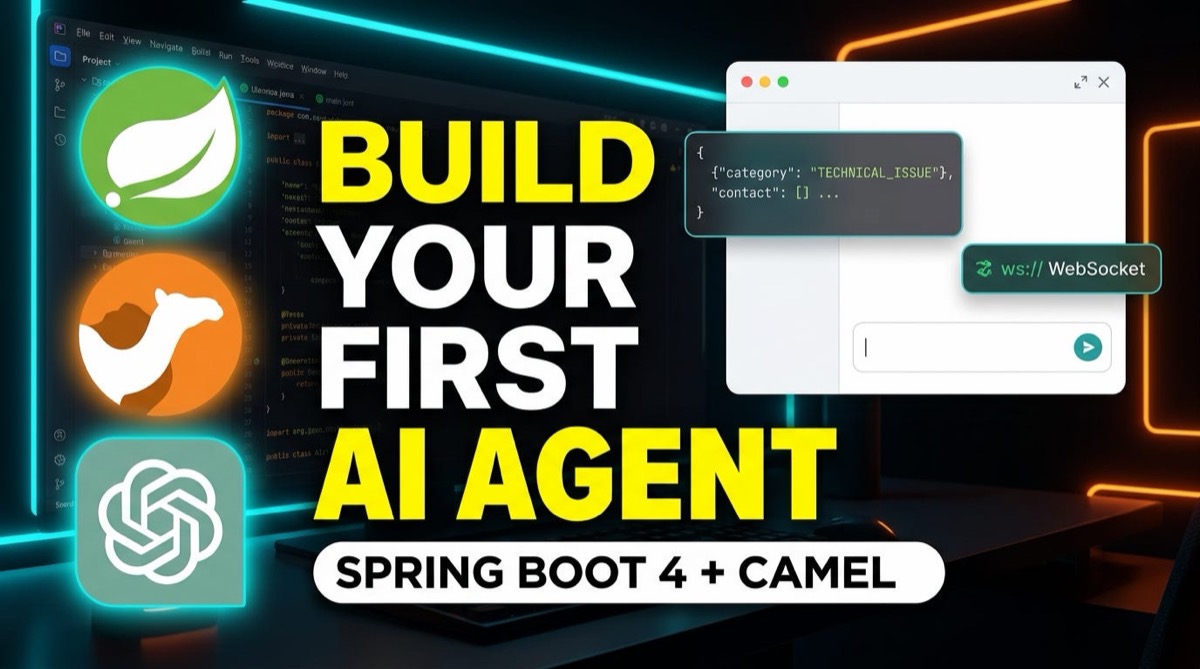
Title Thumbnail
As AI agents move from experimental scripts to production systems, integration becomes the real challenge. How do you take an incoming user request from a web interface, route it through business logic, inject strict system instructions into a Large Language Model (LLM), and return a structured response asynchronously?
In this guide, we will build a lightweight, stateless AI Support Ticket Classifier Agent from scratch using Spring Boot 4, Apache Camel 4.22, LangChain4j, and Vert.x WebSockets.
By the end of this tutorial, you will have a real-time event-driven agent running on Java 26 that receives messages from a web chat interface and outputs structured JSON classifications.
🏗 System Architecture Overview
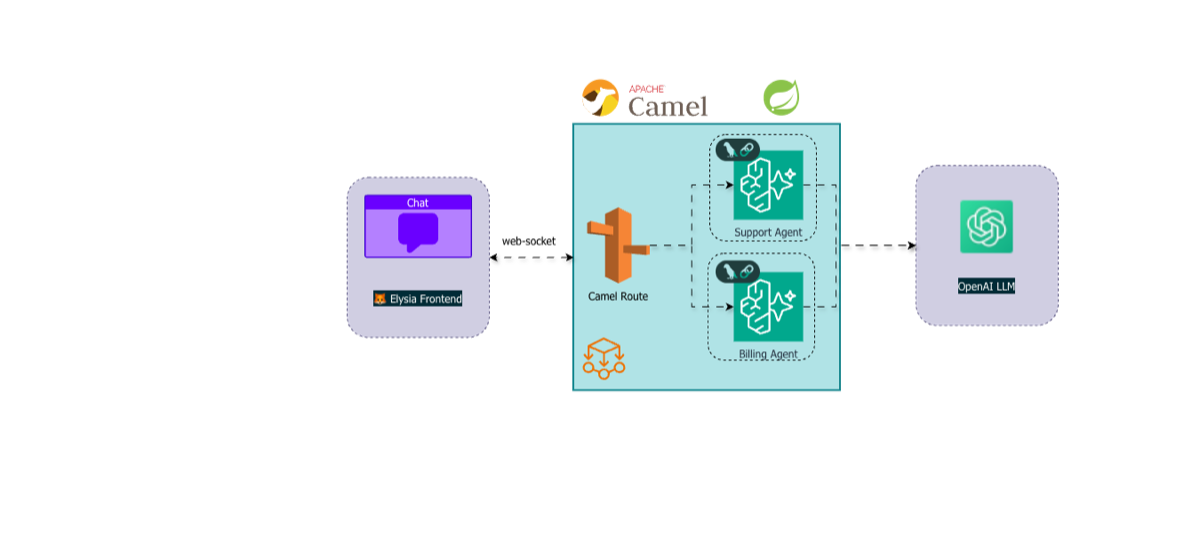
Before jumping into the code, let’s look at how the data flows through our system:
[ Web UI / Browser ]
         │  (Real-Time JSON / WebSockets)
         ▼
[ Vert.x WebSocket Consumer: port 8080 ]
         │  (Camel Exchange)
         ▼
[ Inject Header: SYSTEM_PROMPT ]
         │
         ▼
[ langchain4j-agent: supportOrchestratorAgent ]
         │  (Stateless OpenAI gpt-4o Execution)
         ▼
[ Vert.x WebSocket Producer: port 8080 ]
         │  (Structured JSON Output)
         ▼
[ Web UI / Browser ]
- Inbound Client Message: The user sends a customer support message over a WebSocket connection.
- Camel Integration Route: Apache Camel intercepts the WebSocket frame, offloads processing to a worker thread, and injects dynamic classification instructions using exchange headers.
- Agent Delegation: Camel routes the message to an
AgentWithoutMemorybean powered by OpenAI (gpt-4o). - Outbound Response: The resulting JSON classification is pushed straight back down the open WebSocket connection to the chat client.
🛠 Prerequisites & Tech Stack
To follow along, make sure you have:
- JDK 21 or Java 26 installed.
- An active OpenAI API Key set as an environment variable (
OPENAI_API_KEY). - Maven for dependency management.
Key Dependencies (pom.xml)
We rely on modern Spring Boot 4 starters for Apache Camel and LangChain4j:
XML
<dependencies>
    <!-- Apache Camel Spring Boot 4 Starter -->
    <dependency>
        <groupId>org.apache.camel.springboot</groupId>
        <artifactId>camel-spring-boot-starter</artifactId>
        <version>4.22.0</version>
    </dependency>
<!-- Camel Vert.x WebSocket Starter -->
    <dependency>
        <groupId>org.apache.camel.springboot</groupId>
        <artifactId>camel-vertx-websocket-starter</artifactId>
        <version>4.22.0</version>
    </dependency>
 <!-- Camel LangChain4j Agent Starter -->
    <dependency>
        <groupId>org.apache.camel.springboot</groupId>
        <artifactId>camel-langchain4j-agent-starter</artifactId>
        <version>4.22.0</version>
    </dependency>
<!-- LangChain4j OpenAI Spring Boot Starter -->
    <dependency>
        <groupId>dev.langchain4j</groupId>
        <artifactId>langchain4j-open-ai-spring-boot-starter</artifactId>
        <version>0.35.0</version>
    </dependency>
</dependencies>
⚙️ Application Configuration
In your application.yml, set your server ports and configure the OpenAI chat model:
server:
  port: 8081
camel:
  component:
    vertx-websocket:
      default-port: 8080
langchain4j:
  open-ai:
    chat-model:
      api-key: ${OPENAI_API_KEY}
      model-name: gpt-4o
      temperature: 0.2
💻 Implementation
1. Registering the Stateless Agent Bean
First, we define our supportOrchestratorAgent Spring Bean. We instantiate an AgentWithoutMemory since this getting-started setup focuses purely on single-turn, stateless execution.
package com.cs14.customaiagent.config;
import org.apache.camel.component.langchain4j.agent.api.Agent;
import org.apache.camel.component.langchain4j.agent.api.AgentConfiguration;
import org.apache.camel.component.langchain4j.agent.api.AgentWithoutMemory;
import dev.langchain4j.model.chat.ChatModel;
import org.springframework.context.annotation.Bean;
import org.springframework.context.annotation.Configuration;
@Configuration
public class AgentConfig {
    @Bean(name = "supportOrchestratorAgent")
    public Agent supportOrchestratorAgent(ChatModel chatModel) {
        AgentConfiguration config = new AgentConfiguration()
                .withChatModel(chatModel);
        return new AgentWithoutMemory(config);
    }
}
2. Building the Camel Route
Next, we write the route using Camel’s RouteBuilder. We listen on vertx-websocket:/chat, set a structured JSON system prompt using the header key CamelLangChain4jAgentSystemMessage, and forward the exchange to our registered agent bean.
Java
package com.cs14.customaiagent.route;
import org.apache.camel.builder.RouteBuilder;
import org.springframework.stereotype.Component;
@Component
public class AgentRoute extends RouteBuilder {
private static final String SYSTEM_PROMPT = """
        You are a specialized Customer Support Ticket Classifier.
        Analyze the incoming user message and classify it into EXACTLY ONE of the following categories:
        - [TECHNICAL_ISSUE]
        - [BILLING]
        - [FEATURE_REQUEST]
        - [GENERAL_QUERY]

        Respond ONLY in this JSON format:
        {"category": "<CATEGORY>", "confidence": <SCORE 0.0-1.0>, "reason": "<SHORT_REASON>"}
        """;
    @Override
    public void configure() throws Exception {
        from("vertx-websocket:/chat")
            .setHeader("CamelLangChain4jAgentSystemMessage", constant(SYSTEM_PROMPT))
            .to("langchain4j-agent:supportOrchestratorAgent")
            .to("vertx-websocket:/chat");
    }
}
🧪 Testing the Live Setup
- Start your Spring Boot 4 application.
- Open your frontend web chat application connected to
ws://localhost:8080/chat. - Send a support ticket message:
“I was charged twice for my subscription this month.”
Execution Trace & Output
Camel intercepts the WebSocket message, applies the SYSTEM_PROMPT header, and passes the payload to OpenAI through our agent bean. Within moments, the raw JSON payload streams back directly to the chat window:
{
  "category": "BILLING",
  "confidence": 0.98,
  "reason": "The user inquiry pertains directly to an accidental duplicate payment charge."
}
💡 Key Takeaways
- Decoupled Architecture: By leveraging Apache Camel, your transport layer (WebSockets, REST, Kafka) remains completely decoupled from your AI execution logic.
- Dynamic Instructions: Using the
CamelLangChain4jAgentSystemMessageheader allows you to dynamically inject system instructions without modifying model configs. - Stateless Agents:
AgentWithoutMemoryprovides a lightweight pattern for single-turn classification and task execution.
You can find the code in Github repo here.
🚀 What’s Next?
This setup gives us a solid, responsive agent framework, but it doesn’t remember conversation history between turns.
In Part 2 of this series, we will take this application further by integrating MongoDB Atlas using MongoDbChatMemoryStore and AgentWithMemory to give our agent persistent context across multi-turn sessions!
If you found this tutorial helpful, feel free to give it a clap 👏 and follow for Part 2!
Get new articles by email
One short email whenever a new article is published. No spam, unsubscribe anytime.
Keep reading
API Rate Limiting using Resilience4J & Spring Boot
How API rate limiting works, why fixed windows fail under bursts, and how to implement a sliding-window rate limiter with Resilience4J in Spring Boot, tested with JMeter.
Secure Your Spring Boot and Angular Application with JWT Authentication: A Comprehensive Guide
Secure a Spring Boot backend and an Angular frontend with JWT authentication: how tokens work, how to issue and validate them, and how to attach them from Angular.
Connecting Kafka to Spring Boot: A Step-by-Step Guide Using KafkaTemplate
Connect a Spring Boot application to Apache Kafka with KafkaTemplate: a REST endpoint that produces messages and a consumer that listens to the same topic.
Comments
No comments yet. Be the first to share your thoughts.