Mastering GitHub Copilot Agent Hooks: The Secret Middleware for Enterprise AI Workflows
How GitHub Copilot agent hooks work as middleware for enterprise AI workflows, helping you control response quality and context size.
When working with GitHub Copilot or custom AI coding agents, managing response quality and context size can become challenging. Common issues include:
- Sloppy AI Code Formatting: Copilot generates code that ignores your team’s Prettier, ESLint, or Spotless linter rules.
- Token Bloat & Latency: Context windows get clogged with polite natural language fluff (“Could you please help me…”), repeated imports, and massive corporate copyright header comments.
- Lack of Deterministic Control: Prompt engineering alone isn’t always enough to guarantee strict linter rules or strip token overhead.
In this blog, we will discuss:
- What are Copilot Agent Hooks?
- What are the types of Copilot Hooks available?
- Step-by-Step Implementation: Token Optimizer (Pre-processing) & Style Enforcer (Post-processing)
What are Copilot Agent Hooks?
Copilot Agent Hooks act as a local middleware layer for your AI workflows. Instead of relying solely on the LLM to follow prompt instructions, hooks intercept agent events deterministically.
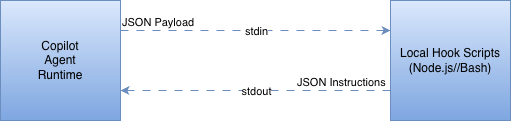
They run local shell scripts (Node.js, Bash, Python) when specific triggers fire during an agent session. The hook receives a JSON payload over stdin, executes your custom logic (like running a linter or cleaning text), and returns instructions back to Copilot via stdout.
What are the Types of Copilot Hooks?
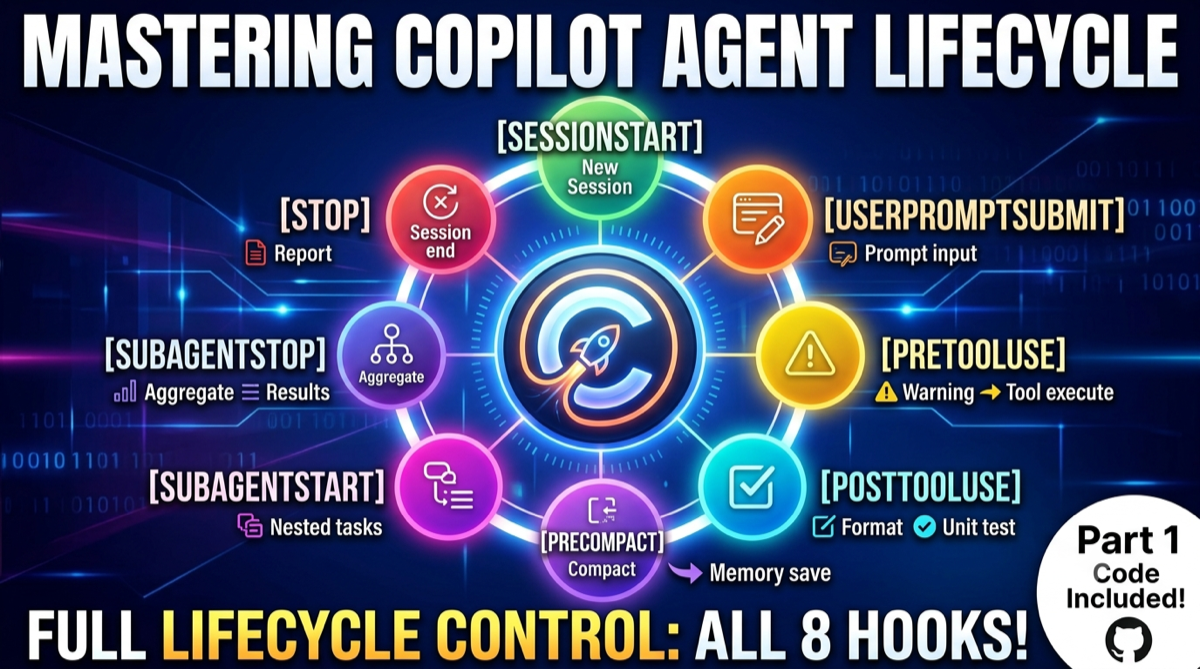
Copilot provides distinct hook triggers across 4 primary operational categories:
- Session Lifecycle Hooks (
sessionStart,sessionEnd/Stop): Fire when a developer boots up or ends an agent session. Useful for loading local environment variables, pre-fetching project metadata, or running audit logs. - Prompt Hooks (
userPromptSubmitted): Triggers the moment you hit Enter on a prompt. Perfect for auditing user queries or trimming prompt tokens using frameworks like Microsoft CLEAR. - Tool Execution Hooks (
preToolUse,postToolUse):
preToolUse: Fires before a tool (like file writes or terminal commands) runs. Allows you to inspect and block dangerous commands (rm -rf,DROP TABLE).postToolUse: Fires after a tool completes execution. Ideal for triggering automatic code formatting, linter validation, or unit test runs.
4. Memory & Subagent Hooks (preCompact, subagentStart, subagentStop): Fires right before conversation context gets compacted or when subagent tasks start/stop, allowing state preservation.
Project Setup & Hook Registration
All hooks are configured using a simple JSON declaration file located under your repository’s .github/hooks/ directory.
{
  "version": 1,
  "hooks": {
    "userPromptSubmitted": [
      {
        "type": "command",
        "bash": "node ./scripts/clear-corporate-optimizer.js ${promptTmpFilePath}",
        "powershell": "node ./scripts/clear-corporate-optimizer.js ${promptTmpFilePath}",
        "timeoutSec": 10
      }
    ],
    "postToolUse": [
      {
        "type": "command",
        "bash": "node ./scripts/enforce-corporate-format.js ${createdFilePath}",
        "powershell": "node ./scripts/enforce-corporate-format.js ${createdFilePath}",
        "timeoutSec": 15
      }
    ]
  }
}
Implementation Details
Step 1. Pre-Processing Hook: The CLEAR Token Optimizer
We will implement a Node.js script that intercepts your prompt right when userPromptSubmitted fires. It strips out conversational noise, removes enterprise copyright comment headers, deduplicates imports inside code blocks, and collapses redundant vertical whitespace.
Create scripts/clear-corporate-optimizer.js:
import { readFileSync, writeFileSync } from 'fs';

// Reject conversational politeness fluff and enterprise header blocks
const REJECT_WORDS = /\b(could you please|can you kindly|would you mind|basically|actually|specifically|just|help me with)\b/gi;
const COPR_HEADER = /(\/\*[\s\S]*?Copyright[\s\S]*?\*\/|<!--[\s\S]*?Copyright[\s\S]*?-->)/gi;

function optimizeEnterpriseImports(codeBlock, language) {
  let lines = codeBlock.split('\n');
  let importSet = new Set();
  let cleanLines = [];

  for (let line of lines) {
    const trimmed = line.trim();
    // Deduplicate Java and TypeScript/JavaScript imports
    if ((language === 'java' && trimmed.startsWith('import ')) ||
        ((language === 'typescript' || language === 'javascript') && trimmed.startsWith('import '))) {
      importSet.add(trimmed);
    } else {
      cleanLines.push(line);
    }
  }

  if (importSet.size > 0) {
    cleanLines.unshift([...importSet].join('\n'));
  }
  return cleanLines.join('\n');
}

function processClearFramework(rawInput) {
  if (!rawInput) return '';

  // 1. Strip heavy corporate license header blocks
  let prompt = rawInput.replace(COPR_HEADER, '');

  let lines = prompt.split('\n');
  let insideCodeFence = false;
  let currentLanguage = '';
  let currentBlockBuffer = [];
  let finalizedOutput = [];

  for (let line of lines) {
    const trimmed = line.trim();

    if (trimmed.startsWith('```')) {
      if (!insideCodeFence) {
        insideCodeFence = true;
        currentLanguage = trimmed.slice(3).toLowerCase().trim();
        finalizedOutput.push(line);
      } else {
        insideCodeFence = false;
        let optimizedBlock = optimizeEnterpriseImports(currentBlockBuffer.join('\n'), currentLanguage);
        finalizedOutput.push(optimizedBlock);
        finalizedOutput.push(line);
        currentBlockBuffer = [];
      }
      continue;
    }

    if (insideCodeFence) {
      currentBlockBuffer.push(line);
    } else {
      // Clean natural language query space
      let cleanLine = line.replace(REJECT_WORDS, '').replace(/\s+/g, ' ').trim();
      if (cleanLine.length > 0) {
        finalizedOutput.push(cleanLine);
      }
    }
  }

  return finalizedOutput.join('\n').trim();
}

const targetFilePath = process.argv[2];
if (targetFilePath) {
  try {
    const originalPrompt = readFileSync(targetFilePath, 'utf8');
    const optimizedPrompt = processClearFramework(originalPrompt);
    writeFileSync(targetFilePath, optimizedPrompt, 'utf8');
  } catch (error) {
    console.error(`[CLEAR Optimizer Error]: ${error.message}`);
  }
}
Step 2. Post-Processing Hook: Auto-Formatting Enforcement
Next, we create the postToolUse script that listens for file edits or file creation events. The instant Copilot drops a file into your workspace, this script formats it using your project’s native linter/formatter (like Prettier or Spotless).
Create scripts/enforce-corporate-format.js:
import { execSync } from 'child_process';
import { extname } from 'path';

const generatedFile = process.argv[2];
if (!generatedFile) process.exit(0);

const fileExt = extname(generatedFile);

try {
  switch (fileExt) {
    case '.ts':
    case '.js':
    case '.json':
      // Enforce Prettier formatting instantly
      execSync(`npx prettier --write "${generatedFile}"`, { stdio: 'inherit' });
      break;

    case '.java':
      // Enforce Java Spotless formatting
      execSync(`./mvnw spotless:apply -DspotlessFiles="${generatedFile}"`, { stdio: 'inherit' });
      break;

    default:
      break;
  }
} catch (formattingError) {
  console.error(`[Format Enforcement Error]: ${formattingError.message}`);
  process.exit(0);
}
Demo & Results
With these two hooks enabled in your workspace:
- Prompt Token Savings: Large prompt dumps containing conversational noise, duplicate imports, and licensing headers see a 20% to 35% reduction in total token payload size, reducing streaming latency.
- Deterministic Code Style: Every TypeScript, JavaScript, or Java file updated or created by Copilot is automatically formatted before you even stage it in Git.
Conclusion & Demo Video
Kudos! We have successfully implemented custom pre-processing and post-processing hooks to optimize GitHub Copilot for enterprise development.
I have also published a hands-on video tutorial demonstrating the live execution, debugging logs, and configuration steps.
- ▶️ YouTube Video Tutorial: Watch the Full GitHub Copilot Hooks Guide
- 💻 Source Code: GitHub Repository — Copilot Hooks Setup
Please feel free to refer to the GitHub repo, drop a clap on Medium if you found this helpful, and leave a comment with your hook setups!
Get new articles by email
One short email whenever a new article is published. No spam, unsubscribe anytime.
Keep reading
Create your Private RAG app with LLM (Ollama with Implementation)
Build a private Retrieval-Augmented Generation (RAG) app with a local LLM using Ollama and LangChain, with a working implementation.
Comments
No comments yet. Be the first to share your thoughts.