Create your Private RAG app with LLM (Ollama with Implementation)
Build a private Retrieval-Augmented Generation (RAG) app with a local LLM using Ollama and LangChain, with a working implementation.
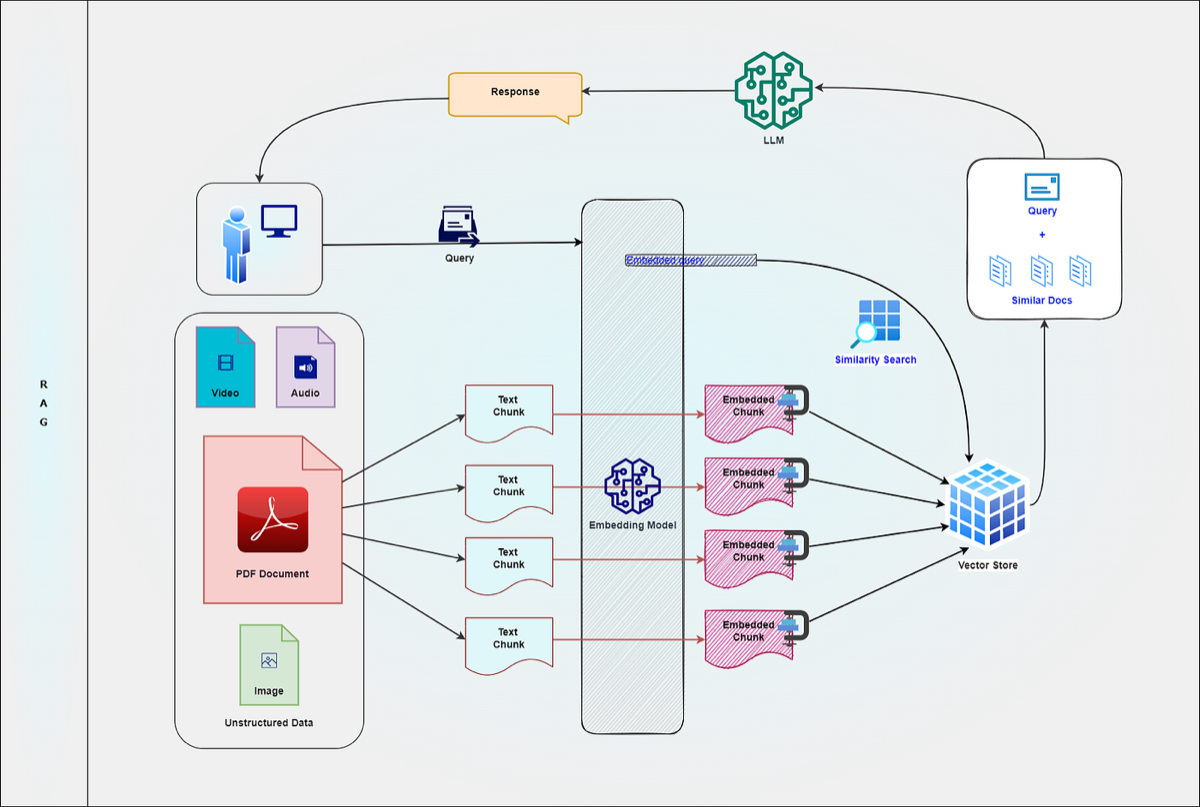

Creating a RAG application nowadays has become very easy. In this blog, we will discuss
- What is RAG?
- What are all the components involved in a RAG app?
- How do you implement a simple RAG application using LangChain and Ollama?
What is RAG?
Retrieval-Augmented Generation (RAG) is a powerful technique that enhances the capabilities of large language models (LLMs) by enabling them to retrieve relevant information from external knowledge sources and incorporate it into their response generation process, thereby improving accuracy, accessing up-to-date information, handling domain-specific queries effectively, and providing a more grounded and explainable output compared to relying solely on the model’s internal knowledge.
What are all the components involved in a RAG app?
A Retrieval-Augmented Generation (RAG) application involves several key components working together to provide context-aware responses:
- Data Source(s): These are the external knowledge bases from which information will be retrieved (e.g., documents, databases, web pages).
- Data Ingestion: This process involves loading data from the source(s) into a format suitable for processing.
- Data Preprocessing: This step cleans and prepares the data, often involving chunking long texts into smaller, semantically relevant segments.
- Embedding Model: This AI model converts the text chunks into numerical vector embeddings that capture their semantic meaning.
- Vector Store: A specialized database used to store and efficiently index the generated embeddings, allowing for fast similarity searches.
- Retriever: This component takes the user’s query, embeds it using the same embedding model, and then searches the vector store to find the most relevant text chunks based on similarity.
- Large Language Model (LLM): The core generative model that takes the user’s query and the retrieved context as input and generates a natural language response.
- Prompt Engineering: This involves crafting effective prompts that instruct the LLM on how to use the retrieved context to answer the query accurately.
- Response Generation: The LLM processes the prompt and context to produce the final answer for the user.
- (Optional) Reranker: A model that can re-score the initially retrieved documents to further improve the relevance of the context provided to the LLM.
- (Optional) Evaluation Framework: Tools and metrics used to assess the RAG application’s performance and quality.
- User Interface: The application that allows users to interact with the RAG system (e.g., a chatbot or a web application).
Implementation using LangChain and Ollama
For this RAG implementation, we will use LangChain, Ollama LLM, and Ollama Index.
As a RAG basic, the User Query will be indexed and compared with the similar index stored on the vector DB. The DB will have indexed data from the chunked source data (in this implementation, we will use PDF) to chunk and store the data. There are many Chuking strategies available we will use fixed-size chuking. Let’s start the implementation.
For this implementation, we will use Jupiter notebook. We aim to understand the RAG implementation rather than building a complete application.
Step 1.Loading the LLM
from langchain.chat_models import init_chat_model
model = init_chat_model("gemma:2b", model_provider="ollama")
This will initialize the “gemma:2b” model from ollama.
Step2. Loading the document.
To load the document, we will use the PyPDFLoader.
from langchain_community.document_loaders import PyPDFLoader

loader = PyPDFLoader("path to the PDF")
document = loader.load()
Step 3. Splitting the document using RecursiveCharacterTextSplitter with a fixed chunk size of 100 and an overlap of 20. This will split the text in our PDF into chunks of 100 texts, there will be an overlap of 20 characters in each chunk.
from langchain_text_splitters import RecursiveCharacterTextSplitter
text_splitter = RecursiveCharacterTextSplitter(
    # Set a really small chunk size, just to show.
    chunk_size=100,
    chunk_overlap=20,
    length_function=len,
    is_separator_regex=False,
)

chunks = text_splitter.split_documents(document)
Step 4. Let’s index(embed) the chunks using the “nomic-embed-text” embedding model.
from langchain_ollama import OllamaEmbeddings
embeddings_model = OllamaEmbeddings(model="nomic-embed-text:latest")
embedded_chunks = embeddings_model.aembed_documents(chunks)
Now the chunks are embedded and available in “embedded_chunks”.
Step 5. Let’s store the embedded chunks in the vector store. We will use Chroma DB to store the vectors.
from langchain_chroma import Chroma
vector_store = Chroma(
    collection_name="india_overview_collection", # collection name
    embedding_function=embeddings_model,
    persist_directory="./chroma_langchain_db1",  # Where to save data locally, remove if not necessary
)
await vector_store.aadd_documents(chunks) # Add the chuks to vector_store
Step 6. Now, combine the LLM with the retrieval of the documents using LangChain. There are many ways we can do this, but let’s use RetrievalQA to chain the retrieval.
from langchain.chains import RetrievalQA
# This chain combines retrieval of relevant documents with language model generation
qa_chain = RetrievalQA.from_chain_type(
    llm=model,
    retriever=vector_store.as_retriever(search_kwargs={'k': 3}), # Retrieve top 3 relevant chunks
    return_source_documents=True # Optionally return the source documents
)
Step 7. Time to query the model.
query = "What are Himalayas comprise?"
result = qa_chain.invoke({"query": query})
print("Question:", query)
print("Answer:", result["result"])
Question: What are Himalayas comprise?
Answer: The Himalayas comprise the three almost parallel ranges interspersed with large plateaus and valleys.
At this point, LLM uses our PDF as a source and retrieves the data.
Similar to this, we can use different types of sources like text files, audio, video, and much more. There are loaders available for each type. You can explore more on the LangChain website (https://www.langchain.com/).
Feel free to comment on your questions.
Get new articles by email
One short email whenever a new article is published. No spam, unsubscribe anytime.
Comments
No comments yet. Be the first to share your thoughts.